The all-in-one AI workspace for your team's documents
Bring the PDFs, decks, recordings, and notes your team already has. Research them with cited answers, produce videos, podcasts, decks, and documents from them, and give reviewers citations back to the original sources.
Set up in minutes · Per-seat pricing · No sales call required
What problem can we solve for you?
One shared library of your team's material, and three jobs it does all day: research it, produce from it, understand it.
Research
Stop digging through folders. Ask.
The answer to most questions at work already exists — buried in sixty PDFs, four decks, and the recording of a call. Put those sources in a shared library and ask. Scholarly answers from your team's own material with citations back to the exact document and page, or runs Deep Research across the whole library and the web and hands back a full report.
- Cited answers from your team's documents — teammates can open the shared project, ask their own questions, and check any claim at the source
- Deep Research reports that pull your library and the web together
- Meetings and calls transcribed and searchable next to the documents

Produce
From source material to finished content in minutes
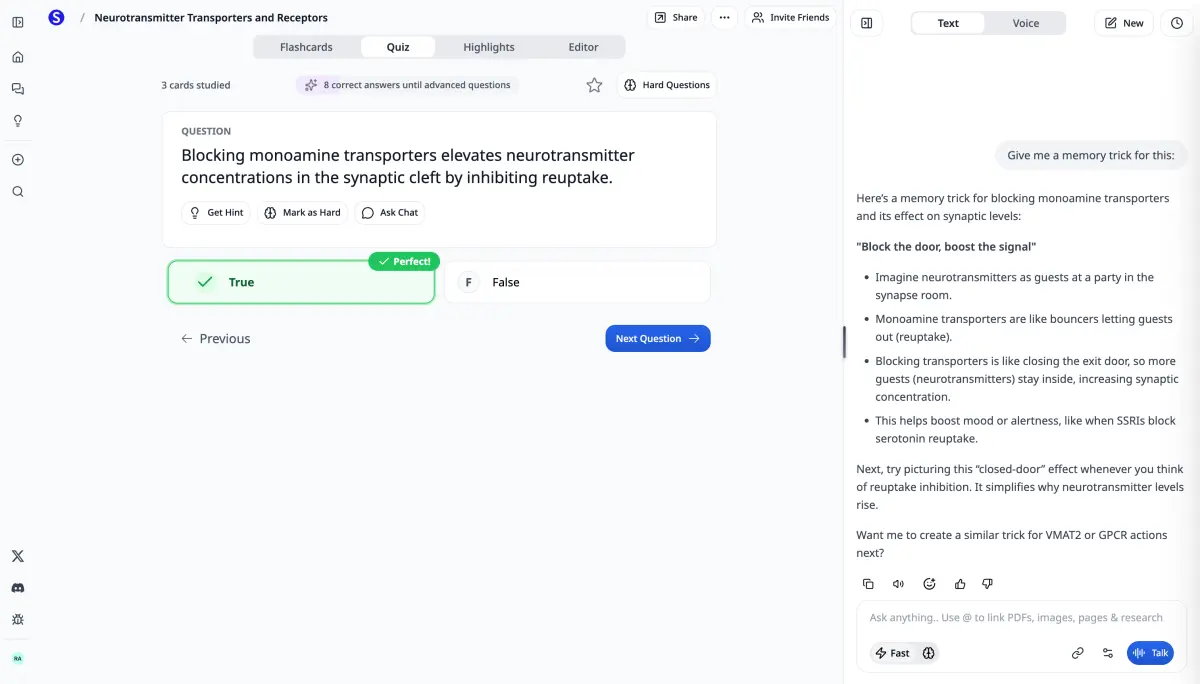
A narrated video, a client-ready deck, a podcast episode, an onboarding course — content that normally costs a production week. Point Scholarly at the source and get a finished artifact that stays true to the material, ready to review and roll out the same afternoon.
- Narrated, chaptered video lectures and slide decks from any document
- Podcasts and audio briefings people can take on the commute
- Documents, reports, quizzes, flashcards, and Summaries — every format from one source, with pages, documents, reports, and decks exported as editable Word, PowerPoint, Google Docs, or Google Slides

Understand
Get the whole team up to speed on the same sources
Nobody reads the 80-page spec, and the handbook dies in a shared drive. Turn dense material into Summaries and knowledge checks that verify understanding — and roll out onboarding and training built straight from the documents you already trust.
- Summaries with a closing study guide section that make dense material readable
- Quizzes and knowledge checks that test understanding, not attendance
- Onboarding and training built from your handbooks, SOPs, and recordings

Up and running in minutes
No sales call, no implementation project, no content migration. Set up a team yourself and invite your people.
Updated September 2026
Create a Teams workspace yourself: name your team, add your first source, invite your teammates, then choose 1–29 seats and pick Premium for Teams ($35 per seat/month, $336 per seat/year) or Laureate for Teams ($110 per seat/month, $1,056 per seat/year). Setup drafts a first artifact from that source for the team while you carry on. Every member inherits that plan plus shared libraries, Owner/Admin/Member roles, activity reporting, and one central bill. Before checkout, the workspace is just your seat on your own plan; upgrade your team plan to add seats, invite teammates, and unlock plan features. Scholarly is an all-in-one AI workspace for team documents: cited answers, Deep Research reports, narrated videos, decks, podcasts, quizzes, and meeting notes from the material your organization already has.
Start a team
Name your team, add your first source, and invite your teammates — then choose the number of seats and pick Premium or Laureate. Setup drafts a first artifact from that source for the team while you carry on. Invites you add are sent as soon as you choose seats.
Add your material
Drop in the documents, decks, recordings, and notes your team runs on. Share them as a library so everyone asks, researches, and builds from the same approved sources.
Ask, generate, roll out
Get cited answers, run Deep Research, or turn any source into a video, deck, quiz, podcast, or Summary. The team gets the finished artifact; you keep the source of truth.
Everything included
Every tool, for every seat, from one source
A paid team plan unlocks the full toolkit and its AI limits for every seat. Without a team plan, the workspace is just your seat on your own Scholarly plan. Upgrade your team plan to unlock more.
- Source-grounded AI chat with citations
- Deep Research across your shared library
- Narrated video lectures and slide decks
- Podcasts and audio briefings from documents
- Quizzes, practice exams, and knowledge checks
- AI Meeting Notes from calls and recordings

Admin controls
Run your team from one place
Everything a team needs to manage itself lives in one workspace — billing, roles, model access, and per-member usage, all in a single view.
- Invite by email or link, with Member and Admin roles
- Shared source libraries and shared projects teammates can open, chat across, and build from — with the owner in control of what goes in them
- Model access controls that apply to the whole team at once
- One central bill after you choose seats and a team plan
- Per-member activity and adoption over the last 7 days
- A Zero Data Retention rule that limits the team to approved zero-retention model routes
- Shared customization profiles so every deck, document, and video follows your house style

AI sovereignty
Never bet your team on a single AI company
AI is how your team solves problems now — so no single vendor's outage, policy change, or price hike should be able to stop the work. Scholarly is multi-model by design.
Models from nine AI labs
OpenAI, Anthropic, Google, xAI, Mistral AI, Z.ai, DeepSeek, Moonshot AI, and Meta in one workspace. If one lab has an outage or blocks a use case, switch models and keep working.
Open-source models included
Open models from Mistral, Z.ai, DeepSeek, and Moonshot AI sit alongside the frontier ones, so your team is never locked into a single closed vendor.
EU-hosted models
Teams working under European data requirements can use EU-hosted models.
Admins choose the models
Model access controls apply to the whole team at once — you decide exactly which labs and tiers your people use.
Need every model hosted in the US or EU? and we'll set your team up.
What teams use it for
Wherever your team runs on documents — research, client work, content, training — Scholarly turns the material into something people actually use.
Research & analysis teams
Run Deep Research across reports, filings, and interviews, and get cited answers the whole team can verify against the original source.
Learn moreContent & marketing teams
Turn briefs, recordings, and product docs into videos, podcasts, decks, and documents — a production line built from material you already have.
Learn moreCompanies & training teams
Give your L&D function a way to ship training without a production budget — internal docs, recordings, and processes become decks, podcasts, quizzes, and searchable notes.
Learn moreSales enablement
Keep playbooks, product docs, and call recordings in one place, then turn them into decks, practice checks, and cited answers for the whole pod.
Learn moreChoose seats and a plan when you're ready
Create the workspace first, then set the number of seats and choose Premium or Laureate. Seats, teammates, and plan limits unlock after checkout.
Premium for Teams
15 AI Creation Credits a week and Premium models for every seat.
- The models and creation allowance of the plan you chose — Premium for Teams or Laureate for Teams
- Shared libraries, roles, and central billing
- Activity and adoption reporting — no team credit balance
Laureate for Teams
80 AI Creation Credits a week and the strongest creation models.
- 80 AI Creation Credits for every member
- Shared libraries, roles, and central billing
- Activity and adoption reporting — no team credit balance
Self-serve supports up to 29 paid seats. Need more people, a rollout across departments, or an invoice? and we'll set you up.
Larger rollout
Talk to our team
Teams is self-serve up to 29 paid seats. For anything bigger, tell us what you're rolling out and we'll reply by email, usually within one business day.
- More than 29 seats, or a rollout across several departments
- Invoicing, procurement, or annual purchase orders
- Questions about grounding, data handling, or admin controls
Teams questions, answered
How many people can I add?
Choose 1–29 paid seats during setup. Before checkout, the workspace has one seat: yours. Upgrade your team plan to add seats and invite teammates. For a larger org, school, or district, talk to our team.
How does billing work?
After naming the team, choose the seat count and either Premium or Laureate, then pay through Stripe monthly or yearly. Yearly billing saves 20%.
What AI models do teams get?
Until you buy a team plan, your own plan controls your AI models and limits. Premium for Teams gives every paid seat Premium; Laureate for Teams adds the Frontier models by name. A stronger personal plan still wins. Every paid seat gets unlimited AI chat across models from seven labs: OpenAI (GPT 6 Luna), Anthropic (Claude Haiku 5.5), Google (the Gemini Flash family), Mistral (Large 3, Small 4), Z.ai (GLM 5.3 Flash), DeepSeek (V4.1 Flash), and Meta (Muse Spark 1.3), including open-source models from Mistral, Z.ai, and DeepSeek. The creation tools add xAI (Grok 4.7), Moonshot AI (Kimi K3), Claude Sonnet 5.5, and frontier models like GPT 6 Astra and Claude Opus 5.5. Admins control which models the team can use, and because providers differ on content policies and availability, no single company's rules or outages stop your team's work.
Where are the AI models hosted?
Scholarly routes across models from nine AI labs, including open-source models from Mistral, Z.ai, DeepSeek, and Moonshot AI. Teams with European data requirements can use EU-hosted models, and if your organization needs every model hosted in the US or EU, contact us and we'll set that up for your Teams workspace.
Can we restrict which AI models the team uses?
Yes. Admins choose model access for the whole team from Team → Billing, under Plan & AI models, model by model or by tier, and can turn on a Zero Data Retention rule so only models on approved zero-retention routes stay available. A team policy can only remove access, never grant a model above someone’s plan.
Does Scholarly train AI models on our documents?
No, not by default. Scholarly's Terms of Service (section 7) state that private User Content is not used to train general-purpose AI models; an optional Scholarly training program requires separate, informed opt-in, and stricter connected-service restrictions still apply. Your library is processed only to deliver the features you ask for, and admins can add a Zero Data Retention rule so the team only uses models on approved zero-retention routes.
Does Teams use a separate AI Creation Credit balance?
No. Before checkout, you use your personal limits. After checkout, each paid seat gets the selected Premium or Laureate limits. Reporting focuses on activity and adoption, not a shared wallet. When someone runs out mid-week, an Owner or Admin can buy that member a one-time credit pack on the team bill. Pack credits never expire.
How do people join the team?
Choose seats and a team plan, then invite by email or share a join link, and assign each person as a Member or Admin. Invites you add during setup are sent once the owner buys the plan, and the plan turns on for each seat.
Is this an LMS?
No. Scholarly makes the content itself — videos, decks, quizzes, podcasts, summaries, research reports — from material you already have. There's no course catalogue, seat-time tracking, or compliance reporting, so teams typically use it alongside an LMS or on its own for material that never justified a full course build.
Is Scholarly Teams just a training tool?
No. Training is one of the jobs teams run on Scholarly, not the whole product. The same shared library powers research — cited answers and Deep Research reports — and production: narrated videos, podcasts, slide decks, documents, quizzes, and meeting notes. If your team never builds a course, Scholarly still works as its all-in-one AI workspace for documents.
What can a team create?
Narrated video lectures, slide decks, flashcards, quizzes, practice exams, Summaries, notes, podcasts, Deep Research reports, and AI Meeting Notes — all generated from your team's shared material, with cited chat answers alongside. On a paid plan, finished pages, documents, research reports, and decks leave as an editable Word or PowerPoint file, or save straight into Google Docs and Google Slides.
How do we know the output is accurate?
Artifacts are generated from the sources you upload, and cited answers link back to the original document and page. Review important output against those sources before sharing or acting on it.
Can each teammate use Scholarly in their own language?
Yes. Each person picks their own app language, and Scholarly's interface is available in English (US), English (UK), Deutsch, Español (España), Español (Latinoamérica), Français, 日本語, 한국어, Nederlands, Português (Brasil), and 简体中文. New accounts open in the language their browser asks for. What the team creates has its own output language, so one shared SOP can become an English, a Spanish and a Korean training video, whatever language each person's interface is in.
Related resources
Use-case pages, comparisons, and help docs for rolling out Scholarly Teams.
NotebookLM alternative for teams
An honest comparison: shared library, roles, reporting, one bill.
vs Gemini Notebook (formerly NotebookLM)
A personal notebook vs a shared team workspace — the honest split.
vs ChatGPT Business
When a chatbot seat is enough — and when grounding wins.
vs Claude for Teams
Compare Claude team offerings with Scholarly Teams.
Teams and Enterprise help
Seats, pricing, roles, and who Teams is for.
Getting started with Teams
Create a team, invite people, share your first library.
How to roll Scholarly out to your team
A practical first-month plan: what to put in the shared library, who to invite first, and how to tell whether it is working.
AI training video generator
Turn SOPs and onboarding docs into narrated, chaptered training videos.
AI sovereignty
Nine labs, open-source models, EU-hosted options — never one vendor.
Content & marketing teams
Briefs and product docs → videos, podcasts, decks, and documents.
One workspace for everything your team makes from its documents
Research it, produce from it, understand it. Start with the material you already have — set up in minutes, then choose seats and a team plan when you're ready to bring teammates in.
Set up yourself · Per-seat pricing · Self-serve up to 29 seats