Editing Your Creations in AI Chat
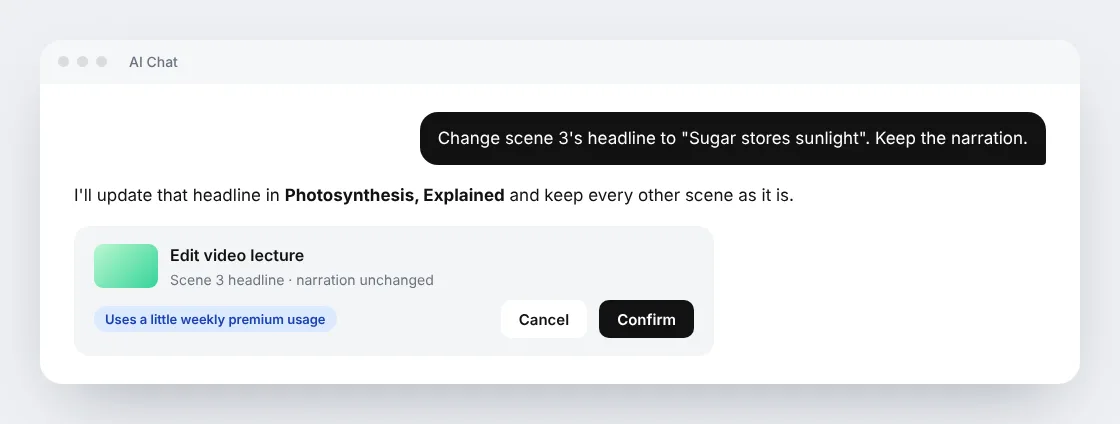
A lecture is almost right, but one headline is wrong. A flashcard needs a clearer explanation. A PDF has last year's date on page 3. You do not need to make the whole thing again. Tell AI Chat what to change, and it edits that part while keeping the rest.
In short
- Open the item and use its AI Chat, or name the item in any chat.
- Say what to change and what to keep, such as "Change scene 3's headline. Keep the narration."
- Check the confirmation card and press Confirm.
- Keep chatting. The result arrives in the same conversation.
What you can edit
| What you made | Good requests | What you get back |
|---|---|---|
| Page | "Add a short example after the second section. Keep the rest." | The page, changed in place, with Undo |
| Flashcard deck | "Explain why the answer to card 8 is correct, with one example." | The deck, changed in place, with Undo |
| PDF or slides deck | "Correct the date on page 3. Keep the layout and pictures." | The updated document |
| File (Word, Excel, and other library files) | "Update the dates without rewriting the other sections." | The updated file, with Undo where offered |
| Standard video lecture | "Change scene 3's headline to 'Sugar stores sunlight'." | A new version of the video, with the original kept |
| Podcast | "Shorten the introduction in chapter 1." | A new version of the episode, with the original kept |
Freestyle and Ultimate video lectures cannot be edited this way yet. To change one of those, ask AI Chat to make a new version.
How to ask for a good edit
- Point at one place. Name the scene, card, page, section, or chapter.
- Say what should stay. "Keep the narration" or "keep the layout" stops a small fix from turning into a rewrite.
- Ask for one change at a time when you can. Small edits are faster and easier to check.
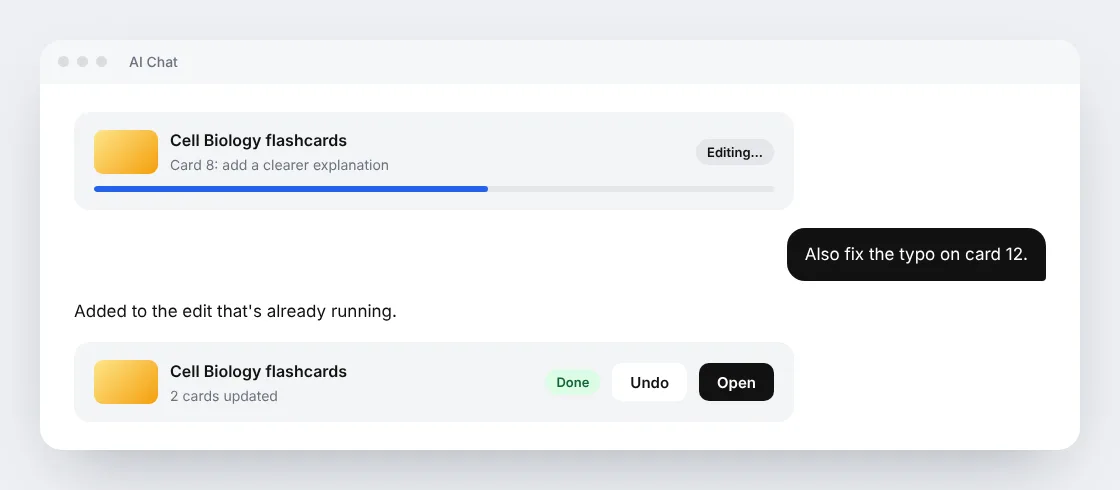
If you remember something else while an edit is running, ask in the same chat. The new request joins the edit that is already in progress.
Videos and podcasts keep what you did not change
When you edit a Standard or Standard Fast video lecture, Scholarly remakes only the scenes you asked about. Every other scene keeps its finished picture and its recorded narration. A headline-only fix does not need any new narration at all. If you change what is said in a scene, only that scene gets new narration.
Podcasts work the same way, chapter by chapter. The chapters you change are recorded again, and the others keep their audio. An episode needs at least one chapter that stays the same, so a one-chapter episode is better remade instead.
Both save the result as a new version. The original stays available, and a later edit starts from your newest version, so earlier fixes are kept.
Following the edit
After you confirm, an editing card in the chat shows that the work is running. You can keep asking questions, open other items, or leave the page. When the edit finishes, the result appears in the same conversation with a link to open it. If an edit cannot be done safely, AI Chat says so and nothing is changed.
What edits cost
Edits use a little of your weekly premium usage, the same allowance as premium chat models. They do not use AI Creation Credits. The confirmation card shows the usage before anything starts, and AI Chat always asks first.
Free accounts need a paid plan with premium usage to start an edit. Premium usage resets every Monday. See Plans and Limits for each plan's allowance.
A big change is a different request. If a video or podcast edit would mean recording most of it again, AI Chat offers to make a new creation instead. That uses AI Creation Credits and has its own confirmation, so an edit never turns into a full remake on its own.
Undo and earlier versions
- Pages, flashcard decks, and files: use Undo on the result to put things back.
- Video lectures and podcasts: the original and every edited version stay in the version list, so you can open any of them.
Related
- AI Chat, the full guide to chatting with your sources.
- Video Lectures, making and sharing narrated lectures.
- Podcasts, AI audio episodes from your material.
- Plans and Limits, premium usage and AI Creation Credits.