How to See Proteins, Cells, and DNA in 3D
Biology is hard to picture from a flat page. Here is how to build a labeled 3D model of a protein, a cell, or a chromosome, what to ask for, and how far to trust it.

A textbook figure of a protein shows one angle, frozen. The thing you are trying to learn, how the chains pack together and where the active parts sit, is exactly what one angle hides. The same goes for a cell's organelles, the grooves of a DNA helix, or the way DNA winds into a chromosome.
You can now ask for any of these in a Scholarly chat and get a labeled model you can turn around. This guide covers what to ask for, how to get a model that is useful for studying, and where the limits are.
Start With a Protein
Name the protein, say how to draw it, and say what to label:
Build a 3D model of hemoglobin: four subunits, two alpha and two beta, drawn as ribbon helices in distinct colors, with the four heme groups highlighted and iron atoms visible, labeled.
Chat confirms the build first, which uses 1 AI Creation Credit. It takes several minutes, and chat replies in the same conversation when the model is ready.
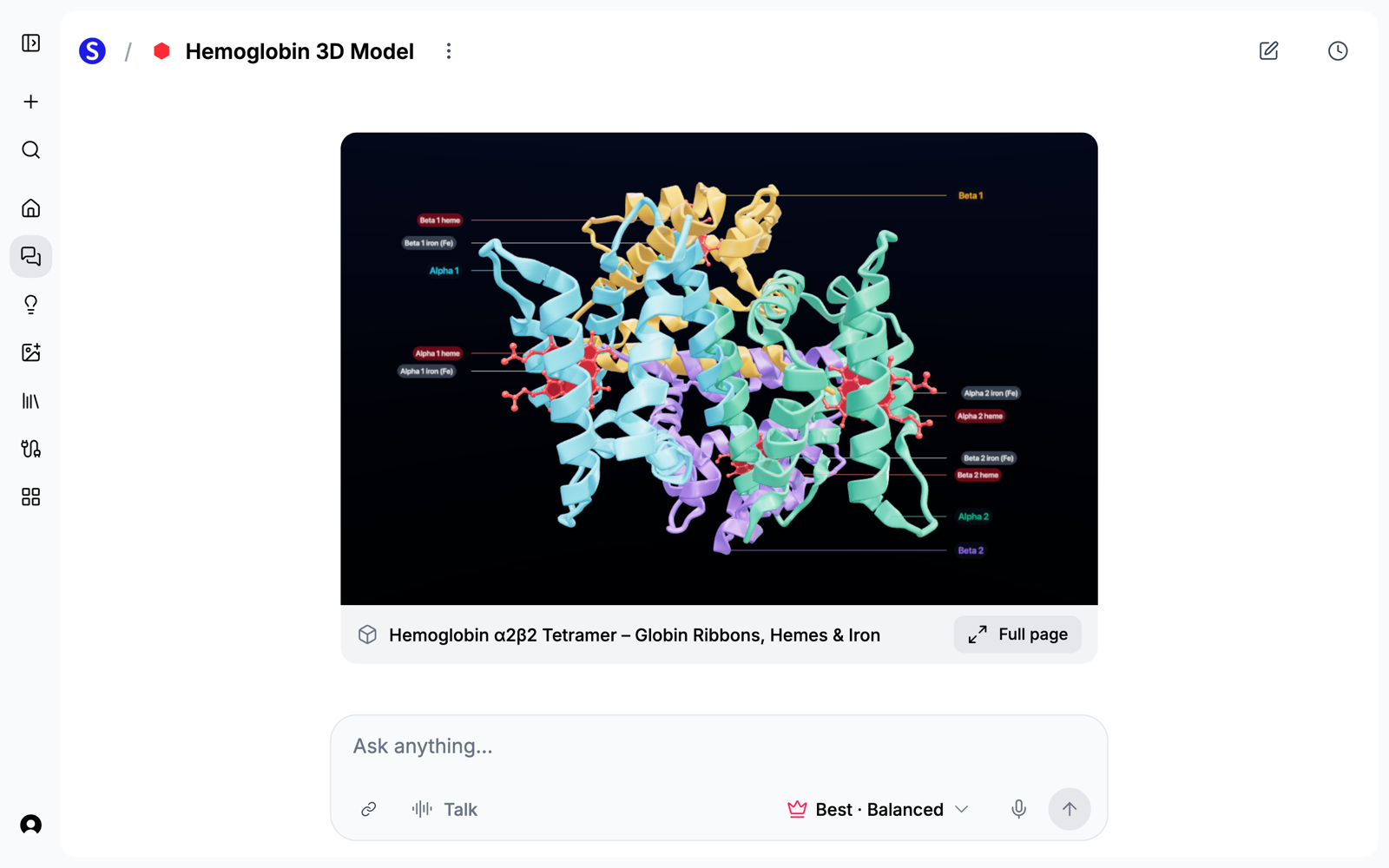
Once you can turn it around, the question from the textbook gets easier to think about: where do the four heme groups sit relative to each other, and which subunits touch? The AI 3D protein model generator has more examples.
Cut a Cell Open
A cell model is most useful with a piece removed, so ask for that directly:
Build a 3D model of an animal cell, cut away to show inside: nucleus with nucleolus, mitochondria with visible cristae, rough ER with ribosomes, smooth ER, Golgi apparatus, lysosomes, and the membrane, each labeled.
List the organelles your course covers. Whatever you list is what gets labeled, so a short list gives you a cleaner model than asking for everything. See the AI 3D cell model generator.
Follow DNA From Helix to Chromosome
For the double helix, ask for the parts that are hard to see in a flat diagram:
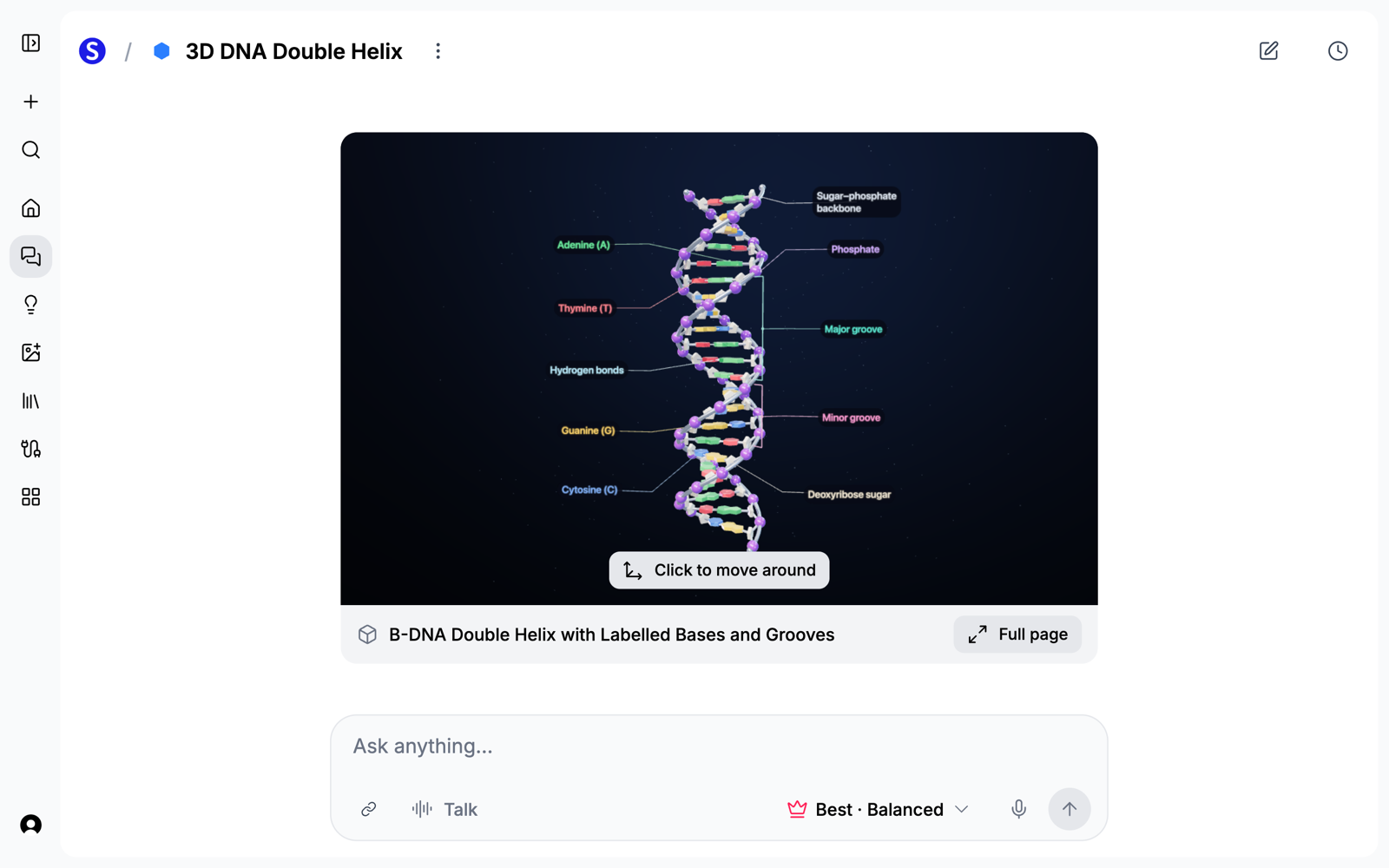
Build a 3D model of a DNA double helix: two sugar-phosphate backbones and colored base pairs, with A, T, G, and C labeled, and the major and minor grooves labeled.
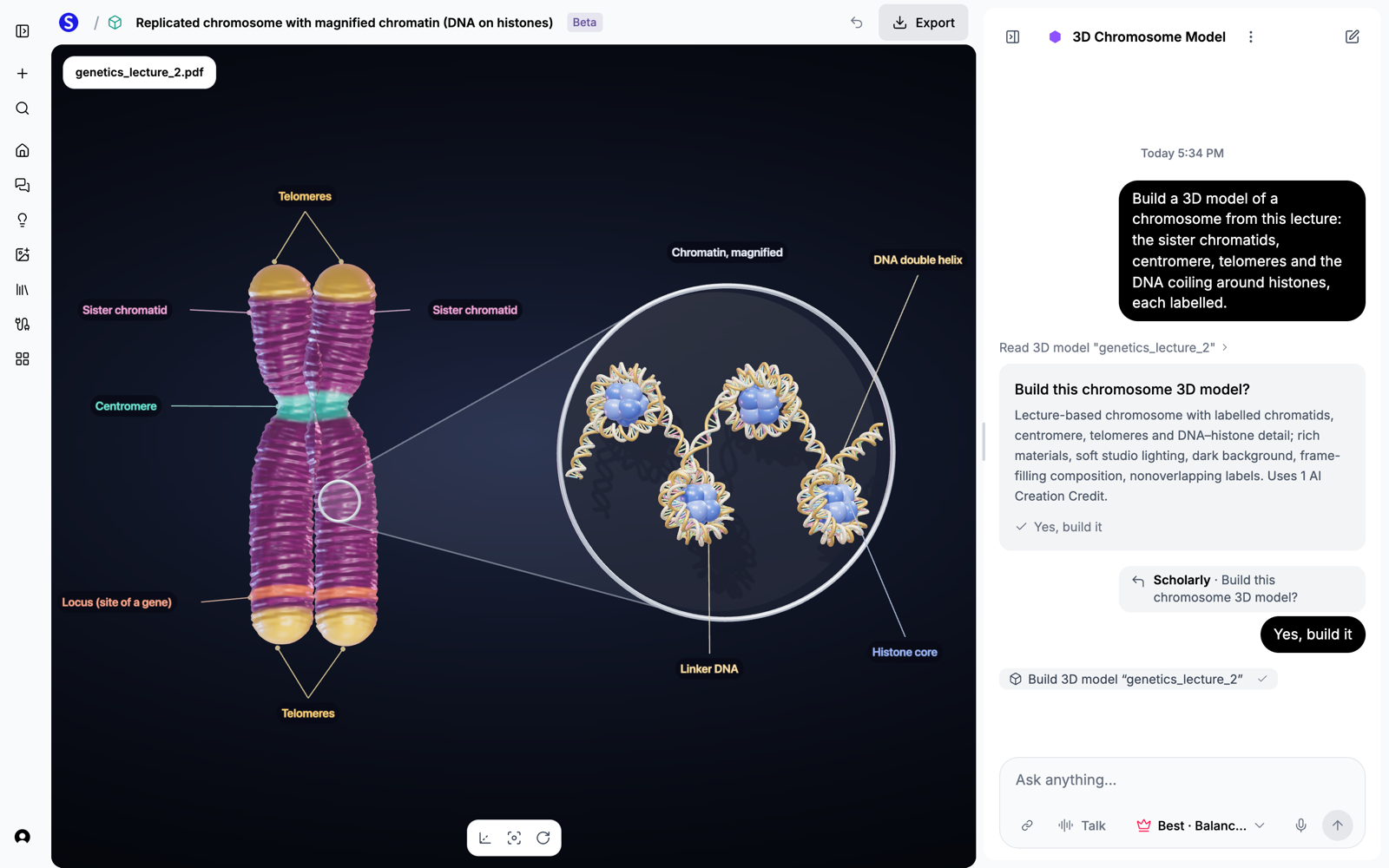
You can also start from your own lecture. On Home, open the 3D model tab, pick your PDF, and ask for the model in the chat beside it. The labels then use your document's words. This chromosome came from a genetics lecture, with a magnified view of DNA wound around histones:
The AI 3D DNA model generator and AI 3D biology model generator cover more of what you can ask for.
How to Ask for a Better Model
A few habits make most of the difference:
- Name the parts. "Label the axon terminal, vesicles, synaptic cleft, and receptors" works better than "label everything".
- Say how to show the inside. Words like "cut away", "cut in half", or "up close" tell the AI what you need to see.
- Ask for one idea at a time. A model of one synapse is easier to read than a model of a whole neural circuit.
- Paste your notes if you have them. They steer the model toward what your course actually covers.
Use It to Study
A model is a good place to start asking questions. In the same chat, try these:
- Ask why a part sits where it does. "Why does each hemoglobin subunit have its own heme group?"
- Ask what changes under a condition. "What happens to this structure in sickle cell disease?"
- Test yourself. Open the model full page and ask chat to turn the labels off, then name each part from memory. Chat tells you first if a change is a free small edit or a full build.
Know How Far to Trust It
These are teaching models. They are good for understanding how something is arranged, and they have limits you should know about:
- They are illustrative. A hemoglobin model shows the idea of four packed subunits. It is not loaded from experimental coordinates, so do not take distances or exact folds from it. For real structures, use the RCSB Protein Data Bank.
- Sizes and proportions are often simplified, so a model can make small parts easier to see.
- Labels can be wrong. Check them against your textbook or lecture before you study from them.
Try It
Open Scholarly, start a chat, and ask for the structure you are studying right now. For more on how it works in chat, read 3D Models Now Work Right Inside Chat.