Producer Notes: A Research Layer for AI Podcasts
Every new Scholarly podcast now ships with timestamped Producer Notes, researched context with cited links, Related Resources, and check-in questions.
Scholarly podcasts already turn your PDFs, slides, notes, recordings, and videos into a three-speaker episode with chapters, a synced transcript, and citations back to your own material. Today they get something podcasts have never really had: a research layer.
Every new episode now comes with Producer Notes - timestamped, researched briefings attached to the exact moments in the audio where extra context earns its place - plus a curated set of Related Resources for going beyond the episode.
What Producer Notes Are
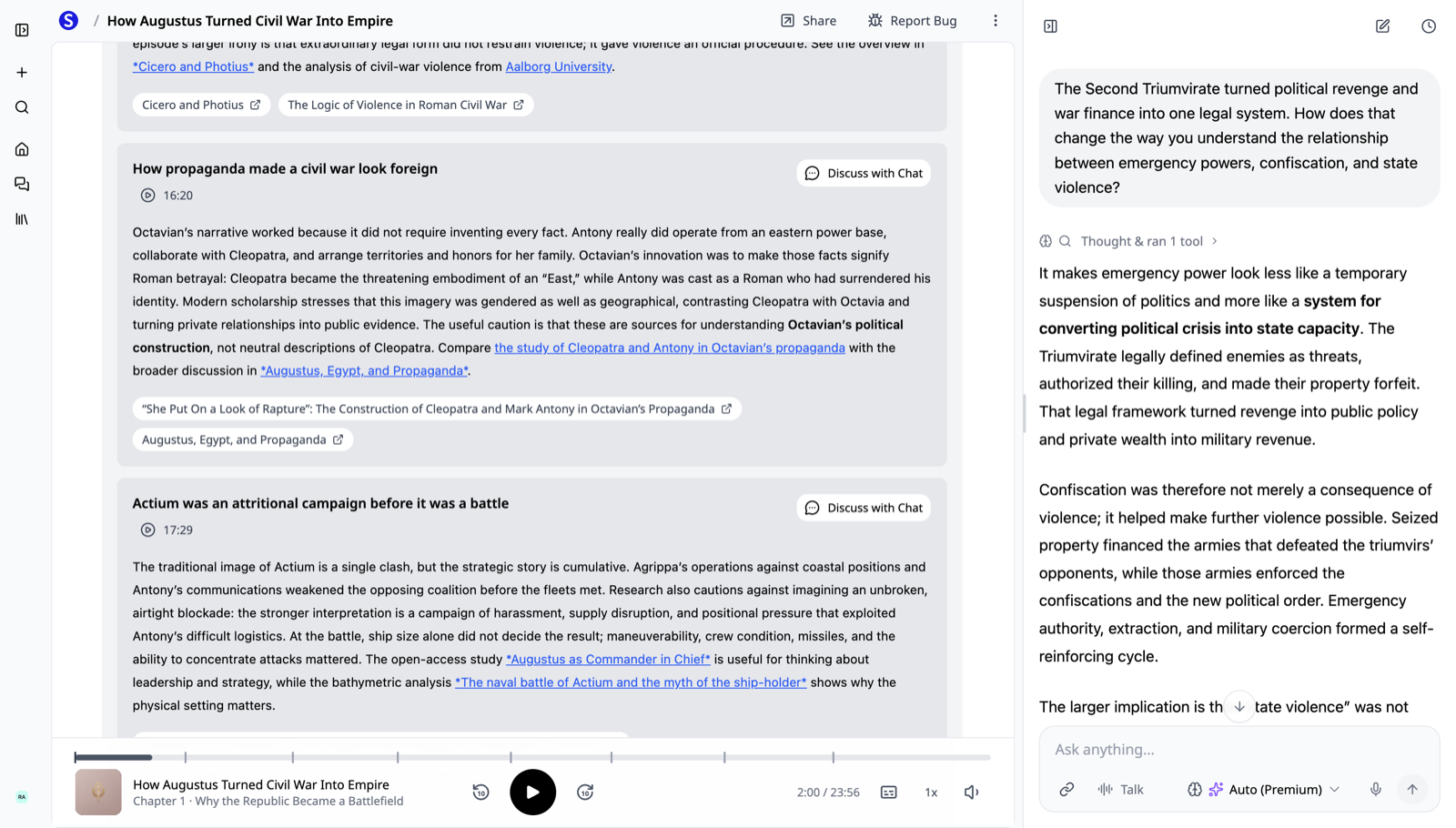
While your episode's audio is being produced, a research agent reads the same chapters, searches the live web, and writes a small number of notes worth your attention. Each note is pinned to a moment in the episode and comes with:
- A timestamp you can play. Tap it and the player jumps straight to that point in the audio.
- Researched context. Not a summary of what you just heard - background, scholarship, and caveats that go beyond your source material.
- Cited links. Every link in a note comes from real web research and is validated before it reaches you. Nothing is invented.
- Discuss with Chat. One tap sends the note into the episode's chat, so you can push on the idea with AI that knows both the episode and the note.
In the episode above - generated from material on Augustus and the fall of the Roman Republic - the notes unpack how propaganda framed a civil war as a foreign one and why Actium was a campaign before it was a battle, each with links to the actual scholarship. Asking a follow-up in chat gets an answer grounded in the episode, not a generic reply.
Related Resources for Going Deeper
Below the notes, every episode now includes a Related Resources shelf: websites, papers, archives, courses, and exhibits chosen for continuing past the episode, each with a line on why it is worth your time. When an episode sparks something, you have a vetted reading list waiting instead of a blank search bar.
One Plan, Not Three Bolt-Ons
The same research pass also plans the episode's listening check-in questions - the quick understanding checks that appear as you listen without pausing the audio. Notes, resources, and questions are planned together against the transcript and anchored to the episode's actual timing, so everything lands at the moment it refers to.
And because enrichment runs while the audio is being generated, none of this adds waiting time. Your episode arrives with its research layer already in place.
Why We Built It
A podcast generated from your own material is a great first pass: you hear the structure of a report, a chapter, or a deck while commuting or walking the dog. But real studying - for an exam, a licensure, a client briefing - doesn't stop at your document. Producer Notes make each episode a starting point with receipts: here is the context, here is where the evidence lives, here is what to read next. If you want to hear it on your own material, start with the AI podcast generator and open the notes panel once the episode finishes.
How to Try It
Open Scholarly and create a podcast from any PDF, deck, recording, video, or topic - new episodes include Producer Notes, Related Resources, and check-in questions automatically. If you're new to Scholarly podcasts, the AI Podcast Generator guide covers styles, languages, transcripts, and everything else an episode includes.
Questions or feedback? Reach us at hello@scholarly.so - we read everything.