Revise from Lecture Recordings Without Rewatching
Turn permitted Panopto or Echo360 transcripts into notes, flashcards, and practice questions without rewatching every lecture.
Do the arithmetic on your recordings and it gets bleak quickly. Two lectures a week, four modules, ten teaching weeks, an hour each: that is eighty hours of Panopto sitting in your module pages by the time revision starts. At 1.5x speed, that still means fifty-three hours of screen time before you write a single flashcard or attempt a past paper.
That plan is difficult to sustain. You may rewatch the lectures you already half-understand, run out of week, and walk into the exam having "revised" by watching a lecturer point at a slide you could have read quickly. Linear rewatching creates the bottleneck.
This guide uses a permitted lecture transcript to create structured notes and retrieval practice. Return to the video only to check a specific gap. Processing time varies with the source, tools, and queue. The workflow uses Scholarly's AI lecture notes, audio to notes, flashcards, and quizzes. Start with the permission rules below.
Quick answer
Do not default to rewatching every lecture from beginning to end. Open the recording in Panopto or Echo360, use the built-in transcript or captions panel, and download the text only if both the platform controls and your institution's policy permit it. Turn permitted text into structured revision notes, reconcile those notes with the slides, and then make flashcards and a practice quiz from the verified version. Review the notes once; spend the rest of the session retrieving. Do not download, copy, rip, screen-record, upload or share the video or transcript unless your university has explicitly permitted that action.
Pick the output for the job
A transcript can feed several study formats. Each serves a different job. Choose the smallest output that matches what you need next:
| Your next job | Best first output | Use it when | Do not rely on it when |
|---|---|---|---|
| Find the lecture's structure and examinable points | AI lecture notes | The recording is long or disorganised | You have not checked names, equations and diagrams against the slides |
| Turn permitted audio into searchable text | Lecture transcription or AI Meeting Notes | You made the recording with permission or own the audio | The file contains other students, patients, clients or confidential discussion |
| Test whether you can recall the content | Flashcards and quizzes | You have already corrected the notes | The assessment depends mainly on extended writing or worked solutions |
| Get a second pass while walking or commuting | AI podcasts | The topic is verbal and conceptual | The topic depends on notation, diagrams, code or spatial detail |
| Re-teach a visual process | AI video lectures | The verified source includes a process or worked explanation | You need the original lecturer's exact emphasis |
| Turn the verified material into a presentation | AI slides | You need a revision deck or a presentation outline | You have not checked every claim against the source |
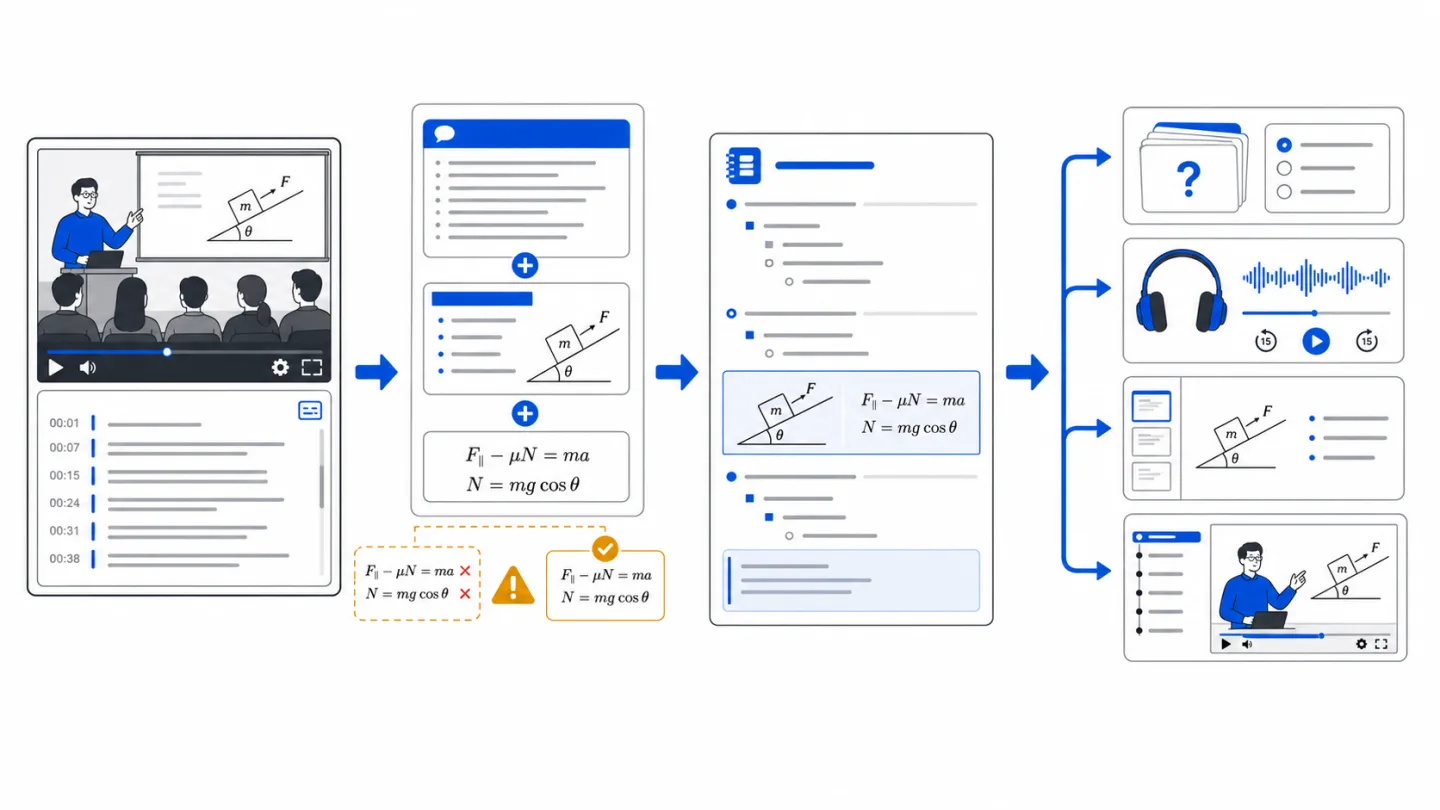
The non-negotiable limit: automatic transcripts can damage equations, diagrams, names, accents and specialist vocabulary. Use the transcript as an index into the lecture. Keep the recording and slide deck beside the generated notes until you have checked every high-stakes detail.
The permission rule behind downloading lectures
Search this topic and you will find blog posts and browser extensions explaining how to pull the MP4 out of Panopto. Ignore them unless your course has explicitly authorized that download. Access to a lecture recording does not automatically give you the right to copy, upload or share it.
The rules are easy to verify because universities publish them. Aberystwyth's current lecture-capture policy says recordings are limited to the students taking the module, prohibits sharing without the lecturer's permission, and warns that automatic captions are not fully accurate. Manchester's recording policy tells students not to copy or pass recordings on except for legitimate transcription. In Australia, the University of Wollongong's current procedures limit recordings to enrolled students and prohibit students from sharing, altering or making them available to others.
Those examples show why your own institution's policy is the one that governs you. A lecture recording may contain the voices and questions of other students as well as copyrighted teaching material. Access to watch it does not automatically grant permission to copy it into a third-party service.
Follow these rules:
- Download only with explicit permission. Avoid third-party downloader scripts and screen-recording playback. Use the access and download controls your institution provides.
- Keep the recording private. Do not drop it into a module group chat, Discord server, shared drive or public AI tool. Other students' voices and third-party copyrighted material may be inside it.
- Using a transcript your player explicitly lets you download may be allowed for private study. Check both the lecture-capture policy and the generative-AI policy before uploading even that transcript elsewhere.
- Recordings you were explicitly permitted to download are in. A module may release a downloadable recording, or a written disability adjustment may grant recording or download rights. Check the exact terms; if they authorize this use, the workflow applies to those files directly.
- Your own recording requires permission. Rules can differ for lectures, seminars, clinical teaching and sessions where other people speak candidly. Ask your module lead and rely on the answer you receive. Do not assume.
One more thing to check before you paste anything anywhere: your university's generative AI policy. Permission to view or download a transcript does not necessarily include permission to upload teaching material to a third-party service. Read the policy for your institution and unit; if it is ambiguous, ask the module lead before uploading.
What your lecture player already gives you
Panopto and Echo360 provide useful transcript controls.
Panopto shows captions or a transcript when the institution has enabled them. Availability and download permissions vary by university. Aberystwyth, for example, documents that viewers can download its automatic-caption transcript while also warning that automatic captions can be inaccurate. If your player offers only viewing and search, keep the transcript inside the player and use it to jump to the exact part you need.
Echo360 / EchoVideo has a searchable transcript panel, and clicking a cue jumps playback to that point. Echo360's current transcript guide documents .txt and .vtt downloads and notes that interactive media can gate downloads until embedded polls are completed. Your institution can still set the policy for how the downloaded text may be used.
Both players can support timestamped notes and bookmarks while watching. City St George's lecture-capture guidance highlights interactive transcripts, search, note-taking and flags as study tools. Echo360 also documents downloading your own notes as a study guide.
A permitted transcript turns a linear recording into searchable text. You can locate a term, jump back to the matching moment, and build questions from the relevant section.
Why linear rewatching is a poor use of limited revision time
Two well-established findings from the memory literature explain why rewatching can feel productive without testing recall.
The first is the testing effect: being made to retrieve information from memory produces markedly better long-term retention than restudying the same material for the same amount of time. During a replay, the answer arrives before you have had to reach for it.
The second is fluency, and it is the trap. Rewatching a lecture at 1.75x, following along, nodding, is deeply, misleadingly pleasant. Everything the lecturer says feels obvious because you have heard it before. Recognition and recall demand different work. In the exam nobody plays you the lecture; you get a blank page and a question, and the blank page is a fundamentally different task from the one you spent twelve hours practising.
The third reason is practical: it may not fit in the week you have left. Fifty-three hours does not exist in most revision timetables. Choose a method that fits your available time.
The workflow: one bounded, source-checked pass
Step 1: Use the transcript your institution permits
Open the recording and inspect the transcript controls. In Panopto, an authorised download may appear in the Captions tab; in Echo360, it may appear in the transcript panel. If download is disabled, keep the transcript inside the player. Use search and click-to-jump to find the relevant section. If your player exposes no transcript at all, skip to the "no transcript" section below.
Use a clear filename such as BIOL2004_wk07_glycolysis.txt. A consistent pattern keeps a full semester searchable.
Step 2: Structure the permitted transcript text
A raw transcript is difficult to revise from. It is disfluent, repetitive, full of "so, er, if we look at the next slide," and it has no headings. Give it a clear structure.
If policy permits third-party processing, upload the transcript and generate structured lecture notes from it. Ask for proposed section headings, definitions, worked examples and the lecturer's exam-relevant asides. Treat the result as a draft: the transcript may have captured those moments badly, and the generator may omit, compress or restate them.
The lecture transcript ties the draft to the right course source. Exact notation, wording, and emphasis still require checking. Compare the draft with the original recording and slides.
Step 3: Reconcile with the slides
Open the slide deck next to the notes. The transcript captures what was said; the slides carry the diagrams, equations and structures that were shown, and speech-to-text may mangle notation and technical vocabulary. Fix the terms, restore the equations from the source, and mark the diagrams you will need to reproduce from memory.
Reconcile every draft with its source. This removes transcription and generation errors before they reach your revision notes.
Step 4: Convert to retrieval practice
Build retrieval practice from the same notes with a flashcard deck and a short practice quiz. Keep the deck small, with twenty to thirty carefully selected cards per lecture. A hundred-card deck per lecture is difficult to finish.
The cards to keep are the ones that make you produce something: state the definition, name the step, give the counterexample, explain why the mechanism fails at low pH. The cards to delete are the ones you can answer by recognising a word.
For a conceptual module such as physiology, criminal law, or macroeconomics, you can also generate a short podcast from the same notes and listen during a walk. For maths, code, or anatomy, keep the visual source beside the explanation.
Step 5: Return to the relevant part of the video
Open the recording when a specific point in the notes remains unclear. Search the transcript for the term, click the line, watch the relevant segment, then return to retrieval.
Give the video a narrow role in your revision system: search, jump to the relevant segment, watch it, and return to retrieval.
If there is no transcript
Some recordings have captions switched off, and some modules aren't captured at all. Other course sources can still support the workflow.
- Record the lecture yourself only with explicit permission. Ask what is allowed for that course and session, especially for seminars, small-group teaching, guest speakers or clinical material. If you receive permission, follow its storage and reuse limits. Audio to notes can process an authorised file. Verify its transcript and notes. If you have a disability support plan, read the exact adjustment or ask the accessibility service about recording and third-party upload.
- Use the slides and your own notes. The deck plus whatever you wrote in the lecture is a legitimate source. Structured revision notes and a flashcard deck can support retrieval practice without copying a restricted recording. Expect gaps where the slides omit the lecturer's explanation.
- Use the assigned reading. If the lecture followed a textbook chapter, the chapter may be the more precise and searchable source, and it is yours to annotate.
A realistic weekly rhythm
A bounded workflow can fit during term, while the lecture is still familiar. Generation and checking time vary, so schedule the work without assuming a fixed number of minutes.
- Same day as the lecture. Turn permitted transcript text into a draft, reconcile it with the slides, and prepare a small deck while you still remember what confused you.
- Two or three days later. Drill the deck once. The questions you miss identify what needs another explanation or source check.
- Weekly. Mix questions from the last few lectures. Replay only the sections connected to a specific gap.
- Revision period. Use the tested decks and clean notes to prepare for past papers.
Starting later reduces the available spacing. The method can still help. Begin with your weakest lectures and prioritise a smaller set of verified notes and retrieval questions.
Limits of this workflow
Keep these limits in view:
- Speech-to-text can mangle notation. Equations, chemical names and case citations deserve manual checks. If your module is notation-heavy, the transcript is a scaffold and the slides are the source of truth. Step 3 exists for this reason.
- A transcript has no diagrams. Anatomy, organic mechanisms, circuit diagrams, and phase diagrams need the visual source. Pair the transcript with the deck and hand-draw the diagrams from memory.
- Past papers still matter. Notes and cards prepare you to attempt questions under time in the exam's real format.
- Attend lectures when you can. Reconstructing a missed lecture takes time. Use this workflow to revisit material you have already encountered.
FAQ
Can I download my Panopto lecture and upload the video file? Only if your course and institution explicitly permit both the download and the third-party upload. A visible download control may still carry restrictions on sharing and republication. A disabled control prohibits ripping or screen-recording the stream. Apply the same rule to the transcript: use a download only when the platform and policy authorise it; otherwise keep the transcript in the player.
Is it against the rules to put my lecture transcript into an AI study tool? It depends on your institution, unit, source, and the tool's approved-use status. Third-party upload requires permission that covers that use. Read the lecture-capture, copyright, privacy, and generative-AI rules for your course. Ask the module lead when they are ambiguous. Never upload or share material you are not authorised to use.
How long does this take per lecture? There is no reliable fixed time. Hands-on work depends on transcript access, lecture density and how many equations, diagrams or errors you must reconcile; AI processing also varies with source length, model, queue and service load. Keep the scope bounded: structure the permitted text, verify the high-stakes details, build a small set of retrieval questions, then revisit only the recording segments connected to a real gap.
Can I record my own lectures instead? Only with the permission or written adjustment that applies to that specific class. Ask before recording, and check whether the permission also covers storage, transcription and third-party processing. Once you have an authorized file, audio to notes can transcribe and structure it, but you still need to verify the output against the recording and any slides.
What if my module has no recordings at all? Work from the slides, your own lecture notes and the reading list. Revision notes and a flashcard deck can still turn those sources into retrieval practice without copying a restricted recording.
Try it on one lecture this week
Pick the lecture you understood least. Use only the transcript access your institution permits, turn the relevant sections into a draft, reconcile the diagrams and terminology against the source, and build a small set of flashcards. Then close the video and drill the cards later in the week.
Compare that focused workflow with a full rewatch at your next review: note which gaps you can now explain without the source and which still need work. Repeat it for the lectures you are quietly avoiding, without assuming every recording needs conversion.
Related guides
- How to turn lecture recordings into study notes (2026): the conversion step in more depth.
- AI lecture notes generator: complete guide 2026: what good generated notes look like and how to judge them.
- How to make a study podcast from your notes: the commute pass, and when audio review is worth it.
- How to take better notes in college lectures: the live half of the problem.
- Tools: AI lecture notes · audio to notes · lecture transcription · revision notes generator · notes to flashcards · revision timetable maker