Skeleton 3D Model
Turn this labelled skeleton around to see the major bones of the human body from head to toe. Labels run down both sides, from the skull and shoulders to the hands, pelvis, legs, and feet, and each bone is explained below.
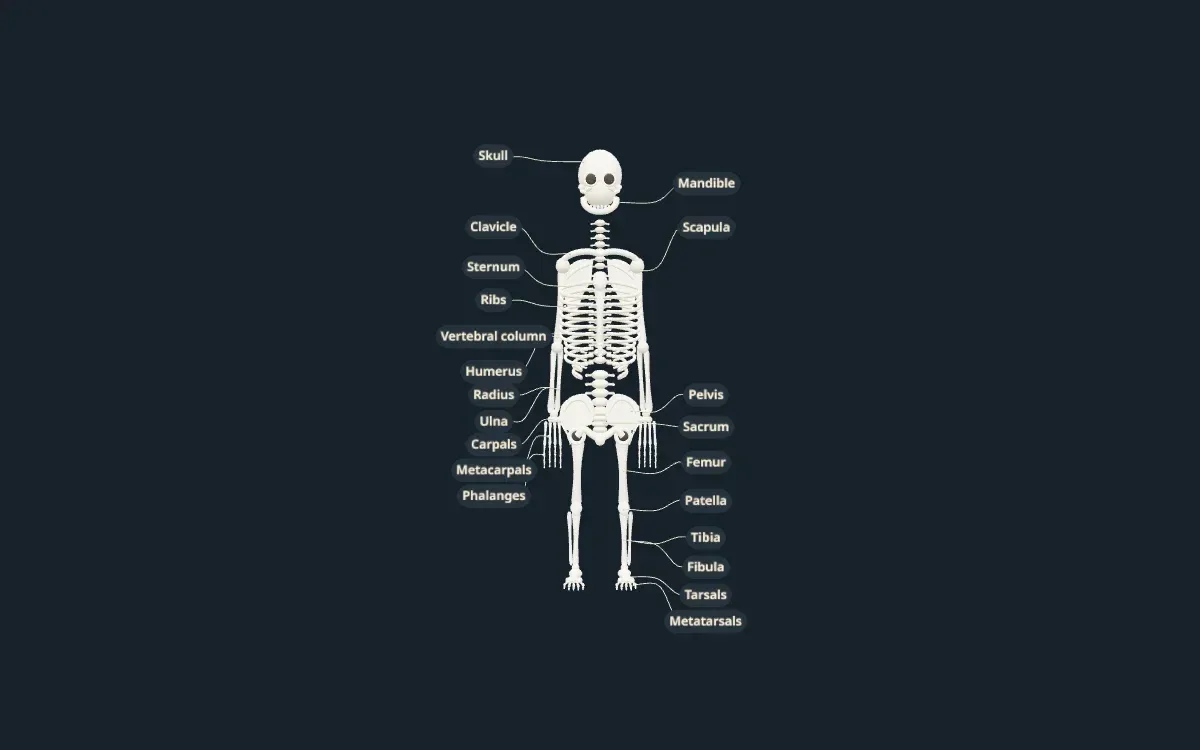
An illustrative teaching model built with Scholarly. Shapes, sizes, and colours are simplified so each part is easy to see.
Free to start. Build one from your own notes, slides, or textbook PDF.
Labelled parts
Bones of the skeleton
The 13 parts labelled on the model, and what each one does.
- Skull and mandible
- The skull protects the brain and forms the face. The mandible, or lower jaw, is its only movable bone.
- Clavicle
- The collarbone. It connects the arm to the body and holds the shoulder out to the side.
- Scapula
- The shoulder blade, a flat triangular bone on the back where the arm attaches.
- Sternum and ribs
- The sternum, or breastbone, joins the ribs at the front. Together they form the rib cage, which protects the heart and lungs.
- Vertebral column
- The spine: a stack of vertebrae that supports the body and protects the spinal cord.
- Humerus
- The long bone of the upper arm, from the shoulder to the elbow.
- Radius and ulna
- The two bones of the forearm. The radius is on the thumb side and the ulna on the little-finger side.
- Carpals, metacarpals, and phalanges
- The bones of the wrist, palm, and fingers.
- Pelvis and sacrum
- The pelvis is the bowl-shaped hip structure that carries the body's weight to the legs. The sacrum is the triangular bone at the base of the spine that joins it.
- Femur
- The thigh bone, the longest and strongest bone in the body.
- Patella
- The kneecap, a small bone that protects the front of the knee joint.
- Tibia and fibula
- The two bones of the lower leg. The tibia, or shinbone, carries most of the weight; the fibula is thinner and on the outside.
- Tarsals and metatarsals
- The bones of the ankle and the middle of the foot.
For class and projects
Using this model for class or a project
For studying, work down one side of the model and name each bone, then the other side. Learning the bones in pairs, such as radius and ulna or tibia and fibula, makes them much easier to remember.
For a skeleton project, use it as a reference for proportions: the femur is about a quarter of a person's height, and the rib cage, spine, and pelvis form the central frame that the limbs attach to.
Teachers can show the model on a classroom screen in biology or physical education lessons. For a course that needs every bone, the joints, or the muscles over them, you can build your own version from your notes.
Make your own
Need a model of your own lesson?
This model was built in Scholarly from a short description. You can build one from your own material, labelled in the words your course uses.
- 01
Add your material or describe it
Pick notes, slides, a textbook PDF, or a lecture recording, or type what the model should show.
- 02
Scholarly builds the model
In a few minutes you get an interactive 3D model with labels. A full build uses 1 AI Creation Credit, and you confirm it first.
- 03
Refine it, then use it
Ask for small changes in chat for free. On a paid plan, export a 4K picture, a turntable video, or a .glb file for slides.
FAQ
Skeleton model questions
How many bones are in the human skeleton?
An adult skeleton usually has 206 bones. Babies are born with around 270, and many fuse together as they grow. This model labels the major bones and bone groups, not all 206.
What is the longest bone in the body?
The femur, or thigh bone. It is also the strongest bone in the body.
Is this skeleton model anatomically exact?
No. It is a simplified teaching model. Bone shapes are simplified and some small bones are shown as groups. It is not a medical atlas and is not for clinical use.
Can I use this model for a school project?
Yes, you can use it as a reference while you study or build a physical model. Exporting pictures or video of models you build yourself needs a paid plan.
Can I make my own 3D skeleton model?
Yes. Sign up, choose 3D model, and describe what you need or add your notes. Scholarly builds a labelled, interactive model in a few minutes. A full build uses 1 AI Creation Credit, and you confirm it first.
Keep exploring
More interactive 3D models
Animal cell 3D model
A labelled cutaway with the nucleus, mitochondria, ER, and Golgi.
Plant cell 3D model
Cell wall, chloroplasts, and the large central vacuole, labelled.
Human heart 3D model
Four chambers, four valves, and the great vessels in a cutaway.
Human brain 3D model
The four lobes, cerebellum, and brainstem, labelled.
Human skull 3D model
The cranial and facial bones and the main sutures.
Human eye 3D model
Cornea, lens, retina, and optic nerve in a cutaway.
DNA 3D model
The double helix with its backbone and base pairs.
Atom 3D model
A carbon atom's nucleus and electron shells, Bohr style.
Solar system 3D model
The Sun and eight planets on their orbits.
3D models in Scholarly
How 3D models work, what they cost, and what they can't do yet.
Turn your notes into a 3D model
Build a labelled, interactive model of whatever you are studying or teaching, then make flashcards and a quiz from the same notes.
3D models are in Beta. A full build uses 1 AI Creation Credit; small chat edits are free.